semiont
Semiont
Semiont is an open, source-grounded platform for building trusted AI knowledge bases — a shared workspace where humans and AI agents annotate, connect, and govern domain knowledge.
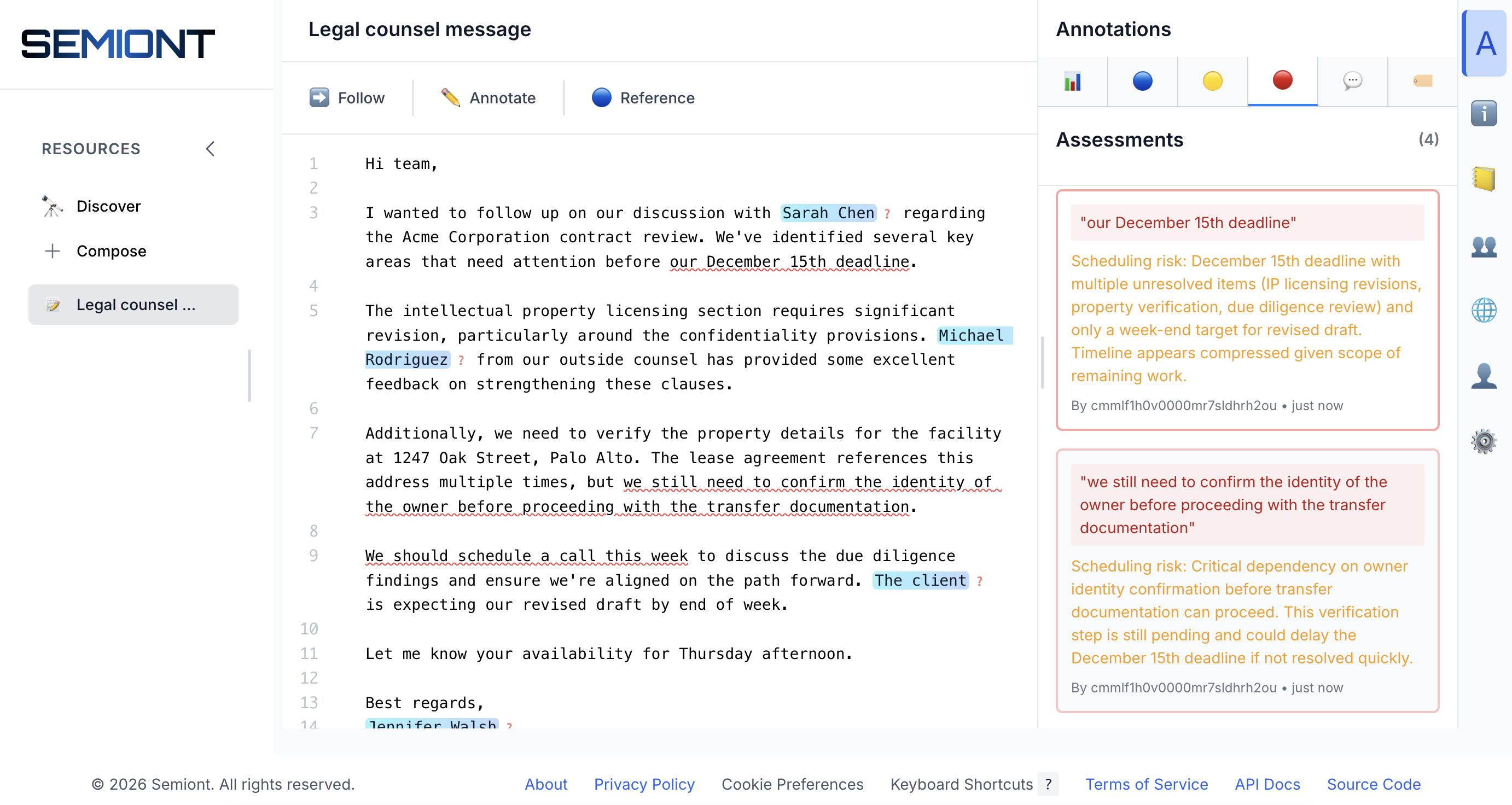
- Annotate and link documents. Humans and AI agents mark entities, comments, and references directly in your corpus — every annotation anchors to a specific passage, in the W3C Web Annotation standard.
- Grow a grounded knowledge graph. Annotations and links project into a graph where every node traces back to its source. Search it semantically, navigate it, audit its provenance.
- Serve trusted context to AI. Feed RAG pipelines, agents, and applications from cited sources instead of unchecked generation. Self-hosted, with inference on Anthropic (cloud) or Ollama (fully local).
No cold start. Most knowledge systems are useless until someone invests weeks in schema design, taxonomy building, and manual data entry — the cold-start problem. Semiont skips it: import documents and AI agents immediately begin detecting entities, proposing annotations, and linking related material for humans to review and refine. The knowledge graph grows as a byproduct of that work — no upfront schema, no ETL pipeline.
Get Started
No npm, no Node.js — the semiont launcher is a single static binary. You’ll need a container runtime (Apple Container, Docker, or Podman), auto-detected:
brew install the-ai-alliance/semiont/semiont
Homebrew serves macOS and Linux. On Windows, the GitHub Release carries a zip holding semiont.exe — see Semiont on Windows.
Configure settings. semiont settings lists everything the launcher keeps; the first you are likely to need is an external inference secret — unless you run a small model on your own machine with Ollama, which needs none. Register an Anthropic key once, as a pointer into your vault; only the pointer is stored, read fresh on every start and written nowhere:
semiont settings secret set ANTHROPIC_API_KEY op://YourVaultName/Anthropic/credential
Create a knowledge base in place and start it. Change --domain — it is the KB’s permanent identity, stamped into the committed event log — and use --inference ollama if you chose the local model:
mkdir my-kb && cd my-kb
semiont init --yes --domain example.com:my-kb --inference anthropic
semiont start
One command brings up the whole stack from published, attested container images — including the Semiont browser. Create your admin user and sign in at http://localhost:3000:
semiont useradd --email admin@example.com # prompts for the password
Then sign the launcher in, ingest a document, and have the stack detect references to concepts in it — the same work you and AI agents share in the browser:
semiont login          # approve in a browser; only tokens come back
mkdir -p papers
curl -L -o papers/attention-is-all-you-need.pdf https://arxiv.org/pdf/1706.03762
semiont yield --upload papers/attention-is-all-you-need.pdf   # prints the resource id
semiont mark --delegate <resourceId> --motivation linking --entity-type Concept
The Quick Start walks through each step.
Or start with content already in place
Clone a knowledge base instead of creating one — it arrives with its identity and configs set, so semiont init is not needed. A plain semiont start runs its local Ollama config; add --config anthropic to run on the key you registered:
git clone https://github.com/The-AI-Alliance/semiont-gutenberg-kb.git
cd semiont-gutenberg-kb
semiont start
- semiont-gutenberg-kb — Public-domain literature from Project Gutenberg
- semiont-template-kb — Empty template, if you would rather fork than
init - Full catalog — seven demo KBs across different domains, plus community knowledge bases
How it works
Humans and AI agents are architectural equals: every operation — whether it comes from the GUI, the TypeScript, Rust, Python or Go SDK, agent skills, or the semiont launcher — travels the same event bus, speaking the same eight verbs: four that write (yield, mark, bind, frame), three that read (browse, match, gather), and one that directs attention (beckon). Any workflow can be done manually, automated by an agent, or shared between the two. The protocol docs cover the design in depth.
Open Source & Community


Semiont is Apache 2.0 licensed and developed in the open. We welcome contributions from the community.
- View on GitHub — Explore the source code and documentation
Part of the AI Alliance — building open, safe, and beneficial AI for everyone.